

A basement is a common space to put a golf simulator because it’s sheltered, out of the way, and minimizes noise disturbance in the rest of the building.
Whether it’s the basement of a private home or a commercial property, many people can’t afford to invest in a simulator that costs tens thousands of dollars. Fortunately, as golf simulator technology has advanced, more affordable solutions have appeared in the market, so there are options that can accommodate a wide range of budgets.
In the case of a golf simulator for basement use, there are a few things you’ll need to give yourself the best experience: a launch monitor that records your shot data, a hitting net, and optionally, a projector for displaying your shot on a life-size impact screen.
Keeping a simulator in a basement can come with a few unique challenges, particularly if the basement is unfinished, but it’s still very possible to pull off. In this article, we’ll review and compare our picks for the best basement golf simulators over a wide range of different budgets.
Note: Golfstead has tested and/or conducted in-depth research into all of the products featured in this guide. Our editorial process for these rankings takes into account a mix of many factors which may include performance, reliability, usability, value for money, cost, and the general consensus from other users of the product. The list that follows may be reassessed or updated over time.
Our Top Picks For Basement Golf Simulators
The following are our top selections based on our own testing, research, and experience:
- SkyTrak MAX SIG10 Golf Simulator Package
- Carl’s Ready-to-Golf ProTee VX Package
- Uneekor EYE MINI SwingBay Golf Simulator Package
- Foresight Sports GC3S PlayBetter SimStudio Package
- Uneekor EYE XO SIG10 Golf Simulator Package
- Carl’s Mevo Gen2 Golf Simulator Package
- Foresight Sports GCQuad Golf Net Practice Bundle
- Swing Caddie SC4 PRO PlayBetter Net Return Package
Note: Prices for the items listed on this page are subject to change. To see the current price, please click on the relevant links below.
1. SkyTrak MAX SIG10 Golf Simulator Package

This simulator package earns the #1 spot on our list for a few reasons: it’s powerful at an accessible cost, it features an awesome enclosure that can fit in basements with a ceiling height of 8.5 feet or greater, and the launch monitor only requires a couple of feet of space in front of the golfer.
This package features the latest iteration of the SkyTrak, the ST MAX launch monitor. The ST MAX is an upgraded version of the SkyTrak+, adding new speed training functionality, a new modular internal design, and an extra USB-C port. No club or ball stickers are needed to measure any data points!
You can count on this outstanding simulator package, designed by The Indoor Golf Shop, to dial in your swing and take your game to the next level.
What Is Included
The SkyTrak MAX SIG10 package consists of the SkyTrak ST MAX launch monitor and a high-quality SIG10 simulator screen and enclosure (designed by The Indoor Golf Shop) that is handcrafted in the USA.
Compared to the original SkyTrak, the ST MAX features a dual Doppler radar system which combines with an improved photometric camera system and machine-learning software to achieve a new level of accuracy and comprehensive data measurement.
Also included are:
- your choice of a hitting mat (5’x5′, 4’x7′ or 4’x10′)
- impact screen (white or high-contrast gray)
- golf simulator projector (optional)
- landing pad turf
The package offers a subscription to the SkyTrak Essential Plan which gives you access to all available training and feedback tools as well as an enhanced driving range. You can optionally upgrade to the Core or Elite plan and gain access to Course Play powered by Trackman or Foresight Sports.
The choices for hitting mat are the Fairway Series 5’x5′ (provides realistic feel), SIGPRO 4’x7′ (easy on the joints, allows level unit placement), and SIGPRO 4’x10′ (center hitting strip ideal for left/right hand switching).
You can also install SIG10 Simulator Flooring — a full flooring option that consists of a hitting strip surrounded by a putting green. This is an awesome choice but is pretty expensive.
Room dimensions of 9 ft high x 12 ft wide x 16 ft deep are recommended. Get your longest club out (usually driver) and make sure you can make a full swing unimpeded.
For more details about what comes with the package and the steps you need to take, visit this page.
2. Carl’s Ready-to-Golf ProTee VX Package

The ProTee VX is a ceiling-mounted system that is more affordable than the Uneekor EYE XO, with similar performance. It provides an extensive set of data parameters, high-end accuracy, a large hitting zone, a super easy setup, and is compatible with the best simulator software on the market.
This package, put together by Carl’s Place, pairs the ProTee VX with Carl’s DIY enclosure available in a range of different sizes.
In addition to our experience with the product, Carl’s Place loves the ProTee VX and considers it one of the best systems for the money.
What Is Included
The Carl’s Ready-to-Golf ProTee VX Package most notably includes:
- a ProTee VX launch monitor
- a Carl’s DIY Enclosure Kit with impact screen (three size options & two screen options)
- a Carl’s HotShot 4’x9′ hitting mat (double-sided)
- an HD projector (models may change)
- a projector ceiling mount
- a golf simulator computer (optional)
The ProTee VX uses Vision and A.I. technology as part of a dual high-speed camera setup. No marked balls or club stickers are needed for any measurements, and data is displayed within a second of hitting your shot thanks to A.I. and machine learning technology.
For data viewing and analysis, the ProTee VX launch monitor comes with the ProTee Labs software which, in addition to showing all your data in an easy-to-read format, provides a slow-motion replay of the club impacting the ball for every shot.
This simulator is also compatible with third-party software solutions TGC 2019, E6 CONNECT, GSPro, Creative Golf, and ProTee Play.
The DIY Enclosure is unique compared to other enclosures because the impact screen sits flush with the floor, providing a seamless transition from turf to screen. You can optionally select a high-contrast gray impact screen that produces a better image indoors.
The included HotShot Mat — soft, high-quality and durable — has a pre-cut replaceable hitting strip that can be swapped out once sufficiently worn. Carl’s Place sells these hitting strips separately for your convenience.
The ProTee VX should be mounted about 3.5 feet (40-43 inches) in front of the hitting area and 9-10 feet above the ground, so a minimum ceiling height of 9 feet is required. We really do believe it’s a game-changer in the launch monitor space. For full details on what’s included, go here.
3. Uneekor EYE MINI SwingBay Golf Simulator Package

You can think of the Uneekor EYE MINI as a portable EYE XO with an on-board display. It may not be quite as powerful as the EYE XO in terms of features and data points, but it’s considerably more affordable and its accuracy is practically just as good.
Taking into consideration cost, power and features, the EYE MINI is one of our top choices for portable launch monitors.
This package pairs the EYE MINI with Rain or Shine Golf’s high-quality SwingBay enclosure which is perfectly suited for basement spaces. It’s one of the best turn-key simulator solutions currently on the market.
What Is Included
The EYE MINI SwingBay Simulator Package includes:
- a Uneekor EYE MINI launch monitor
- a SwingBay enclosure system (8’x10.5′ or 9’x12′)
- a SwingTurf hitting mat (5’x5′ or 4’x9′)
- a full HD short throw projector with high lumens
- a projector ceiling mount
- landing pad turf (optional)
- a laptop bundle optimized for golf simulation (optional)
The EYE MINI is a portable launch monitor that contains two high-speed infrared cameras and measures an array of ball and club data points. It boasts Club Optix technology which allows you to view slow-motion closeups of the club impacting the ball.
The SwingBay enclosure is 4’2″ deep and either 8’H x 10’5″W or 9’H x 12’W. Made of a 1.5″ extruded aluminum frame, ballistics-grade woven polyester impact screen, and ripstop blackout walls, it offers plenty of room to work on your game.
The included SwingTurf hitting mat (5’x4′) was designed by Rain or Shine Golf to provide an optimal balance between realistic fairway feel and forgiveness. An upgrade to a larger 9’x4′ SwingTurf mat is available.
The third-party software titles compatible with the EYE MINI are E6 CONNECT, TGC 2019, and GSPro.
Minimum space requirements are 8’6″ H x 11′ W x 16′ D.
This fantastic golf simulator package gives you reliable camera-based indoor performance, a wide range of data points, accuracy, and plenty of features for game improvement and entertainment.
4. Foresight Sports GC3S PlayBetter SimStudio Package

The Foresight Sports GC3S allows you to experience the power of the Foresight Sports GC3 through a subscription model with a low entry cost.
Without a subscription, you’ll be able to view ball data parameters on the LCD display after each shot. You can then optionally sign up for a Gold Subscription which unlocks more functionality and allows you to use simulation software.
The GC3S is widely considered by many in the golfing community to be one of the best bang-for-your-buck launch monitors on the market. It’s similar in many ways to the EYE MINI above.
And with this package put together by PlayBetter, you get a full-size enclosure and hitting mat at an affordable price so you can use the GC3S as part of a complete simulator studio.
What Is Included
The GC3S PlayBetter SimStudio Package comes with the Foresight Sports GC3S launch monitor, along with:
- a PlayBetter SimStudio hitting bay (screen, enclosure, mat, side netting, landing turf)
- an HD golf simulator projector (model may change)
- a projector mount (floor or ceiling)
- a protective metal case for the GC3S
- a Bushnell Pro X3+LINK laser rangefinder
The GC3S comes with a one year of the Gold Subscription with the initial purchase. A Gold Subscription, which costs $499/yr, unlocks access to 25 courses, club data, sessions, clubs, the FSX software suite, and more.
With the GC3S, you have access to six ball metrics, and the Gold Subscription adds four club metrics. Also included is the Bushnell Pro X3+LINK laser rangefinder which can integrate with the launch monitor data to provide real-time, personalized club recommendations and enhanced course management insights during real rounds out on the golf course.
Your space for this setup will need to fit whatever size enclosure you choose, and you’ll need to be able to make a swing with your longest club. At the time of writing, there are four enclosure size options ranging from 8-13 ft wide and 5.25-10 ft deep.
This simulator package enjoys a high average rating of 4.9/5. You can think of the GC3S as a newer replacement for the Bushnell Launch Pro. For full details, check out this page.
5. Uneekor EYE XO SIG10 Golf Simulator Package
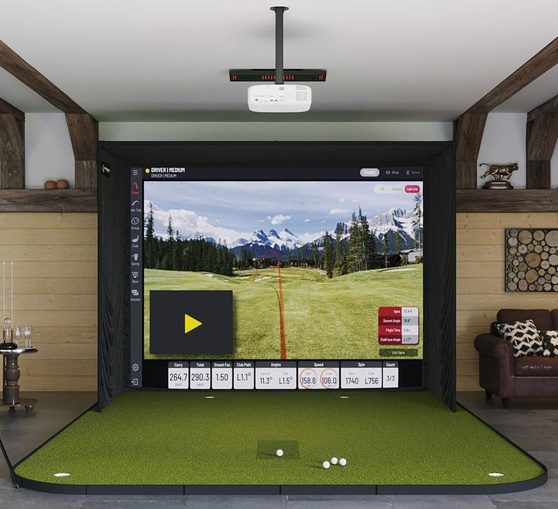
The EYE XO is a highly successful overhead-mounted system by Uneekor. Many golfers opt for the EYE XO because it’s powerful, reliable, measures a slew of data points, has excellent software compatibility, and doesn’t require marked balls.
The EYE XO delivers high precision on shots from 10 cm to 435 yards. It comes with some of the best simulator software on the market, and, unlike many other simulators, it handles putting extremely well.
This particular simulator package uses The Indoor Golf Shop’s popular SIG10 enclosure which can fit into most home spaces.
What Is Included
The Uneekor EYE XO SIG10 Simulator package was put together by The Indoor Golf Shop and includes:
- the EYE XO bar tracking system with high-speed cameras
- a SIG10 simulator screen & enclosure
- a golf simulator projector (optional)
- landing pad turf
- your choice of hitting mat (5’x5′, 4’x7′ or 4’x10′) or full flooring
The high-speed cameras can track club path, spin, and ball impact at over 3000 fps. Because the EYE XO tracking system is mounted overhead, you can swing freely on your hitting mat without having to worry about hand switching or precise positioning.
The EYE XO uses unmarked ball technology so you can use any ball you want. This is a major improvement over Uneekor’s QED system, in addition to offering more powerful features and additional data parameters.
The included View software has its own cool features such as a swing motion analysis tool and slow-motion videos of your club impact and ball spin. The Pro, Champion and Ultimate software packages give you access to the Refine and Refine+ software plus other benefits.
The EYE XO is compatible with The Golf Club 2019, E6 CONNECT, Creative Golf, ProTee Play, GSPro, and GameDay.
A space that’s at least 9 ft high x 12 ft wide x 16 ft deep is recommended. For more details about what comes with the package, optional add-ons, pricing, and setup instructions, visit this page.
6. Carl’s Mevo Gen2 Golf Simulator Package

The Mevo Gen2, the successor to the Mevo+, is a versatile consumer-tier launch monitor equipped with Doppler radar and Fusion Tracking technology. It’s great for basement use, although you’ll need at least eight feet of space behind the hitting area to set it up.
This studio package by Carl’s Place, designed for home use, is one of the best to pair with the Mevo Gen2. Carl’s Place has been in business since 2006 and has grown to be one of the most trusted indoor golf destinations in the USA.
Plus, the setup can be customized to the nth degree through Carl’s BYOS tool, from the enclosure size to the software, hitting mat and more, so you don’t have to settle for the default components.
What Is Included
The Carl’s Mevo Gen2 simulator package includes:
- a FlightScope Mevo Gen2 launch monitor
- a Carl’s Place DIY Enclosure with impact screen (six size options)
- a Carl’s HotShot 4’x9′ hitting mat (double-sided)
- your choice of HD golf simulator projector
- a projector ceiling mount
- a golf simulator computer (optional)
Measuring 18 data points and coming with high-quality simulation courses out of the box, the Mevo Gen2 is comparable to the SkyTrak MAX and Mevo+ but is even more affordable.
The Mevo Gen2 can be used with the free FS Golf app or FS Golf for PC, giving you real-time performance data, saving of sessions, skills challenges, and more. Access to third-party solutions Creative Golf, Awesome Golf, GSPro, E6 CONNECT, and E6 APEX are also available, and eight E6 CONNECT courses are included with the device at no extra cost.
At the time of writing, you can choose between the BenQ AH700ST (1080p) and BenQ AK700ST (4K) projectors, both of which are designed with golf simulation in mind.
Carl’s Place recommends that you have at least 19 feet of depth for this setup. The Mevo Gen2 needs to sit eight feet behind the ball, and you’ll also need enough space to fit the enclosure size you choose and mount the projector.
We love this simulator package because the Mevo Gen2 is accurate and highly affordable, and Carl’s Place is there to help you every step of the way.
7. Foresight Sports GCQuad Golf Net Practice Bundle

How would you like to benefit from a top-of-the-line camera-based portable launch monitor used by prestigious coaches and golf pros like Phil Mickelson and Rory McIlroy?
That’s what this simulator gives you. It comes with the powerful GCQuad Launch Monitor by Foresight Sports, which uses a quadrascopic camera system that is unbeatable in an indoor environment like a basement.
This package pairs the GCQuad with your choice of robust net & mat system by The Indoor Golf Shop. With this lean setup, you can count on being able to get the most accurate ball flight data so you can dial in your game.
What Is Included
This package consists of the GCQuad launch monitor with an alignment stick and other accessories. The GCQuad has direct-to-screen output so you can view your numbers without any separate device or software.
This is paired with your choice of golf net by The Indoor Golf Shop. Options include square, rectangular or rounded nets as well as a premium SIGPRO Golf Net which has an aluminum frame with a snap-button system. Able to withstand ball speeds of 225 mph, the SIGPRO is easy to assemble, collapsible, and can even attach with a SIG Preferred or Premium Impact Screen for projector use.
You can also add SIGPRO Turf (6 ft x 10 ft) or one of The Indoor Golf Shop’s premium hitting mats such as the SIGPRO Softy, available in a range of sizes, to the package.
The SIGPRO Turf mat is ten feet long, allowing for continuous ball return from the screen back to the hitting area. It doubles as a putting green and rolls up and stores like a carpet.
This simulator is compatible with the full Foresight Sports software suite including FSX Pro, FSX 2020 and FSX Play. It also can integrate with third-party solutions E6 CONNECT, GSPro, Awesome Golf, and Creative Golf.
Room dimensions of 8.5 ft high x 12 ft wide x 12 ft deep are recommended.
It’s pricey, sure, but it’s a fact that nobody who gets a GCQuad regrets their purchase. It works great for a basement setup because the components are flexible and it doesn’t require space behind you on the target line.
8. Swing Caddie SC4 PRO PlayBetter Net Return Package

The Swing Caddie SC4 PRO is the latest and most powerful budget launch monitor by Voice Caddie. It’s an upgrade to the original SC4, providing more data in the app, better data accuracy, and new enhanced app features.
While the SC4 PRO supports golf simulation, it also has an onboard display that allows you to get your numbers without any software. This is a combination that you really only see in the expensive high-end units.
This simulator package, offered by PlayBetter, pairs the SC4 PRO with either The Net Return Home Series or larger Pro Series hitting net.
What Is Included
The SC4 PRO PlayBetter Net Return Package features the SC4 PRO launch monitor and:
- The Net Return Home Series or Pro Series golf net (your choice)
- The Net Return Pro Turf with side netting, sandbags and rubber tees (optional)
- The Net Return No Fly Zone V2 accessory (optional)
The Swing Caddie SC4 PRO is a Doppler radar device that measures eight data parameters: carry/total distance, apex height, spin rate, clubhead speed, ball speed, launch angle, smash factor, and launch direction. Spin axis, sidespin, backspin and dispersions are also measured in the app.
The SC4 PRO’s companion app, VOICECADDIE S, contains a 3D driving range and allows you to view dispersions, record swing speed without having to hit any balls, track stats, and more. The device can be integrated with the E6 CONNECT software as well.
Voice output, a barometric pressure sensor, and a remote that enables you to operate the launch monitor from a distance are other benefits offered by this system.
The Net Return’s hitting nets, usable indoors or outdoors, feature an instant ball return design, powder-coated, rust-resistant aluminum frame, quick-connect assembly, and UV-shielded netting. The Home Series model has a size of 7 ft x 7 ft, while the Pro Series is 8 ft wide by 7.5 ft tall.
The Pro Turf Mat is ten feet long and provides continuous ball return from the screen back to the hitting area. It doubles as a putting green and rolls up and stores like a carpet.
In addition to the space requirements dictated by the net, you’ll need enough depth to accommodate the SC4 PRO, although the good news is that it requires less depth than most other radar-based devices.
For golfers who appreciate an onboard display but are still constrained by a tight budget, you can’t do much better than this package.
Buying Guide
Investing in a quality golf simulator for your basement is a big step.
Because of this, it’s important to consider all the factors that will affect the experience and match it with what your goals and requirements are.
Here are the most important factors you need to consider when figuring out what golf simulator will suit you best:
1. Size
Size is obviously a critically important factor in golf simulators. You need to have a clear understanding of the space available in your basement to contain the simulator, and what its dimensions are.
Measure the width, length and height of your space and compare it to the minimum space requirements of every golf simulator you look at. Some golf simulators have quite a large footprint, while others are more compact.
Basements can have limited ceiling height. You’ll need a bare minimum of 8 feet of height for a golf simulator — anything less and you can pretty much forget it. You will need at least 12 feet of depth, but you will need more if you’re using a radar-based launch monitor.
You also have to consider if ceiling or floor joists will get in the way of your setup in an unfinished basement. On the other hand, joists may come in handy if you need to mount an overhead launch monitor like the EYE XO.
2. Retractability
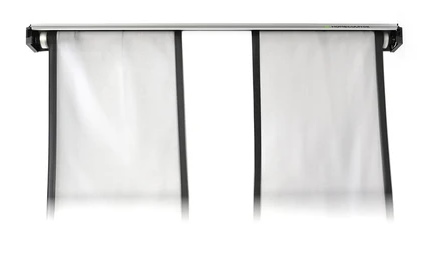
In many cases, a retractable screen is very valuable for basements.
A retractable screen will allow you to make room for other things in a matter of seconds — for example, if you need to set up fitness equipment, create storage space, or set up a play area for kids.
If you need to restore your space back to its original form on demand, we definitely recommend a simulator with retractable functionality. While we don’t feature any in this guide, you always have the option of pairing your chosen launch monitor with something like the HomeCourse ProScreen 180.
These kinds of simulators tend to be most useful in garages, but they can also be valuable in basement spaces.
3. Water & Humidity

Because a basement is underground, it can be prone to dampness and humidity. High humidity can damage electronic simulator components such as launch monitors and projectors.
If your basement tends to get humid and you cannot regulate it, your best bet is to have a net setup along with a portable launch monitor like the SkyTrak MAX, Mevo Gen2 or GCQuad. Your net can be left where it is, and when you’re not playing, you can bring your launch monitor and laptop/tablet upstairs and set up when you want to play again.
However, we strongly recommend using a dehumidifier in your basement to keep the humidity in check. This is common practice, particularly in more humid climates.
Another consideration is moisture. During periods of heavy rain, basements can flood, and this can wreak havoc on golf simulator components sitting on the floor. This is the last thing you want to happen to an $8000 launch monitor.
If there is any chance that your basement might flood during heavy rains, you should consider taking measures to prevent this from happening such as installing a sump pump or waterproofing the basement. If needed, get in touch with a specialist for advice.
Otherwise, it might be a good idea to use a ceiling-mounted golf simulator system like a ProTee VX or Uneekor along with a ceiling-mounted projector. This way, you’ll keep sensitive electronic components off the floor where water can accumulate. In this case, also try to keep wires, cords and cables off the ground as much as possible.
4. Simulator Software

You should also consider what kinds of things you want to do, games you want to play, and activities you want to take part in on your golf simulator. There are many software options available.
Using the launch monitors on this page as examples, SkyTrak comes in a basic plan, which gives you a practice driving range, and an Essential Plan which gives you minigames, numeric display, game-improvement tools, and many other advanced features.
Uneekor’s in-house Refine & View software offers full course play and, with advanced features like Club Optix and a swing motion analysis tool, allows you to have information-rich practice sessions and view detailed club and ball data for each shot.
The highly customizable E6 CONNECT software offers various course simulations, training aids, minigames, tournaments, and more. There’s also The Golf Club 2019, which not only has your typical practice range, but also numerous multiplayer modes, online tournaments and events, and even the ability to design your own course!
Other software possibilities may include FSX, Creative Golf, E6 APEX, GSPro, and Awesome Golf.
What software features do you see yourself using most often? Do you just want to practice on the range, play world-class courses, or both? Consider what software options are available when looking at simulators, and make your decisions accordingly.
5. Budget

Of course, your budget is very important when shopping for a golf simulator. Not everyone can afford simulator packages that cost $10,000 or more; fortunately, there are great options that cost below this amount.
With that said, it’s important to realize that the less you spend, the less you’ll usually get, both in terms of equipment and software.
In this guide, we’ve tried to include quality golf simulators over a wide range of budgets that could work well in a basement. But the great thing is that you don’t have to drop the full cost of a simulator at once.
Our recommended golf simulator source here provides easy financing options that allow you to pay for your golf simulator over the course of a year or longer. Don’t forget about this option.
Conclusion
Golf simulators have become a lot more accessible and affordable over the past decade, and this means more golfers than ever before have been able to have their own basement setup.
Basements are popular places to house a golf simulator because they’re out of the way and help insulate the noise from the main level of the building.
However, they can also come with challenges, many of which are associated with the basement being unfinished. For example, you may have to deal with flooding or moisture, or you may have to wire the basement before you can even hook up your electronics.
A quality, reliable golf simulator can be a huge boon to your golf toolkit. Finding a simulator package that is suitable for your basement is certainly possible with some research.
Each of the simulator options reviewed above offer excellent value for the cost. We’ve given you the information you need to make a decision; now it’s up to you to go the rest of the way.
While it’s likely that no golf simulator setup will tick every one of your boxes, some will come pretty close to doing so.
Thanks for reading this guide. What golf simulator are you considering for your basement? Let us know your thoughts by leaving a comment below.
The post 8 Best Golf Simulators For The Basement – 2026 Reviews & Buying Guide appeared first on Golfstead.
Learn More About Golf
If you want to learn more about golf, check out these other helpful resources!
-
 Uneekor QED Launch Monitor Review – Where It All Started
 - How To Build An Indoor Putting Green – Step-By-Step DIY Guide

-
10 Best Golf Launch Monitors For Home – 2025 Reviews & Buying Guide
-
12 Best Golf Balls Of 2026 – Reviews & Buying Guide
-
10 Best Golf GPS Watches – 2026 Reviews & Buying Guide
-
10 Best Indoor Putting Greens – 2025 Reviews & Buying Guide


